Showing posts with label Graphics and Photo. Show all posts

Advanced image editing, enhancement and analysis software. The program contains both most image enhancement features found in conventional image editors plus a number of advanced features not even available in professional photo suites.


Features

  • Automatic brightness, contrast, gamma and saturation adjustment
  • Build-in conventional and adaptive filters for noise reduction, edge extraction etc.
  • Retouch tools
  • Retinex filter for reducing shadows and increasing local contrast
  • Deconvolution for out-of-focus and motion blur compensation (see below)
  • Easy red-eye removal
  • User specified filters in spatial and frequency domain
  • Resize, rotate, crop and warping of images
  • Scanner, camera and printer support
  • File format support:
    Read/write BMP, ICO, CUR, WMF, EMF, PNG, MNG, GIF, PCX, JPEG and JPEG 2000 images
    Read CR2, RAS, PNM, PGM, PPM, HIPS and Matlab files
  • Morphological operations
  • Color model conversion: RGB, CMY, HSI, Lab, YCbCr, YIQ and PCA
  • Distance, Fourier and discrete cosine transformation
  • Math expression module for creating and transforming images and advanced "pocket" calculator with equation solver
  • Plugin system for adding more specialized features. See below for available plugins
Homepage: http://logicnet.dk/
Download: ImageAnalyzer.exe
File Size: 1.26MB
18 October 2009 2 komentar

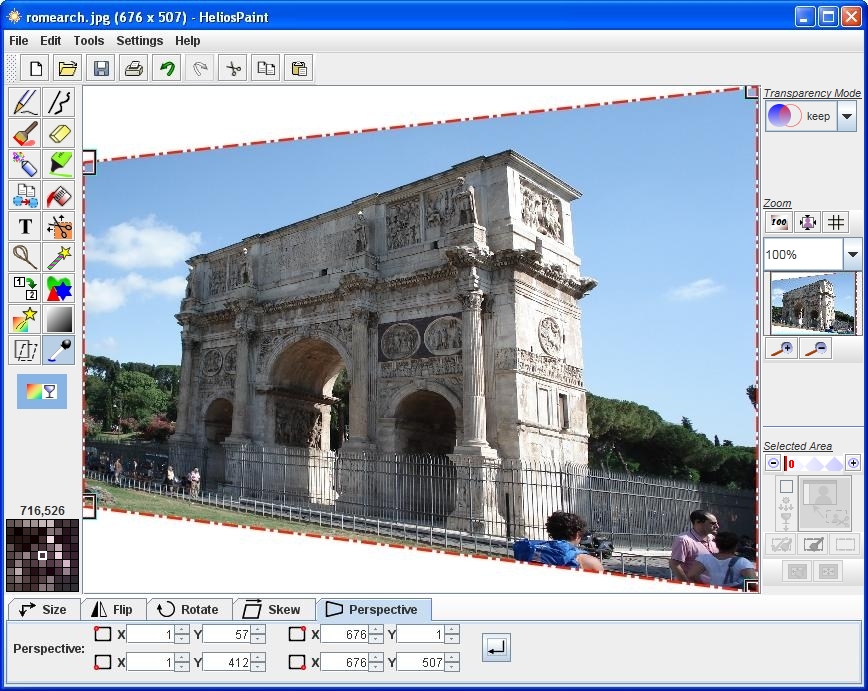
HeliosPaint is a freeware paint program for creating and editing images. It runs on Microsoft Windows, Mac OS X, Linux and Unix and is written in Sun Microsystem´s Java programming language.


Tools and features in HeliosPaint currently include:

* Pencil for editing pixels.
* Freehand and straight lines with choice of width, dash pattern, line joint and line end.
* Paint Brush with sizeable head.
* Spray Can with sizeable head or global spray option.
* Paint Can with local and global replace. Colour bleed sensitivity allows nearby similar colours to be painted.
* Shape tool for creating freehand, regular polygon, star, moon and heart shapes.
* Text entry with choice of font, style, underline and rotation.
* HSB/RGB/contrast/gamma adjustment of image.
* Image invert, gray, colour filter, blur, sharpen, edge detection, oil painting effect, emboss.
* Image colour and transparency adjustment by flat, round, rectangular and ´fit to shape´ gradient patterns. This allows areas of the image to be darkened, brightened and colour enhanced.
* Image flip, scale up, scale down, rotate, shear, perspective view.
* Full colour pallet with adjustable transparency and colour grabber.
* Zoom in/out with optional zoom grid.
* Text and image paste from clipboard. Image and image segment copy/cut onto clipboard.
* Scissors, lasso and wand for selecting and moving image segments. Sensitivity of lasso and wand is adjustable. Transparency of overlaid segments is adjustable. Scissors can cut out various shapes including regular polygons, stars and hearts. When part of the image is selected, all paint operations apply only to that area.
* Saving selected areas as transparent gif or transparent png files.
* Undo and redo.
* Printing with auto fit to page.
* Reads and writes image file formats: bmp, gif, jpg/jpeg, pct/pict, pcx, pgm, png, ppm, psd, ras, tga, tif/tiff, xpm.
* Supports images up to 12 megapixels in size (a high end computer is recommended for working with very large images).

Download HeliosPaint for Linux and MacOS.

Requires Java Runtime Environment. Get It Here.

What’s New in version 1.4.1:

* New image filters.
* Greater line width support.
* New selection tool.

Homepage: http://www.heliospaint.com/
Download: HeliosPaint.exe
File Size: 1.18MB

14 October 2009 0 komentar


PhotoFunia is an online photo editing tool that gives you a fun filled experience. You upload any photo and just wait to see the magic. Our proprietary technology automatically identifies the face in the photo and let's you add cool photo effects and create funny face photo montages.

PhotoFunia is free and very easy to use. Just select an effect you like from over 100 different effects, upload your photo, and PhotoFunia will handle the rest for you.

This service is a Online freeware from PhotoFunia.com, so you can use this image software from PhotoFunia Web.

05 October 2009 0 komentar


You can resize your image for Facebook. VSO Image resizer organizes your photos by shrinking their resolution or moving them within your hard drive. It is the perfect tool for those who store their digital pictures and images on their PC and who want to resize, compress, convert, create copies, import or organize photos.
With this freeware, you can create e-mail friendly versions of your images, load them faster, move them easily from folder to folder, change their format, edit large numbers of image files and thus save space on your hard drive. VSO Image resizer is integrated into the Windows explorer shell, right click on your pictures and start working on your pictures!

Features:

* Convert between different graphic formats
* Configurable compression/resolution ratio
* Support file formats: Jpeg, gif, bmp
* Handle single picture or batch mode
* Reduce size photos perfect for web publishing/share photos by email
* Integrate in windows explorer or works as a stand-alone application
* Fast processing
* Import directly from your memory cards
* Save history of destination folder
* Variable options and settings for advanced users
* Multilingual support (available languages…)
* Optimized for Windows 2000 / XP / Vista
VisitWebsite
Download 5.53MB

26 July 2009 0 komentar

virtualStudio is a stand-alone, full-featured photo editor that can run virtual Photographer and other plug-in filters. Now you can quickly and easily re-touch and enhance your photos like a professional, using the power of plug-ins.virtualStudio is a stand-alone, full-featured photo editor that can run virtual Photographer and other plug-in filters. Now you can quickly and easily re-touch and enhance your photos like a professional, using the power of plug-ins. virtualStudio includes all the features you’d expect to find in high quality editing software, and even comes with a selection of picture frames and the ability to add a title and copyright information.


Future :
* Includes virtual Photographer
* Runs many popular Photoshop plug-ins
* 30 file formats including jpg, jpeg2000, png, bmp, gif, tiff, psd and some RAW files
* Easily applies layered effects with "Blend" mode
* Image Browser with full-screen slideshow
* Opens multiple photos
* Auto Expose, Enhance, Sharpen, Equalize and White Balance
* Adds picture frames, copyright and titles
* Adjust brightness/contrast, gamma, hue and color
* Full Curves functionality
* Histograms
* Shadows and highlights
* Flip and rotate to 1/10th degree
* Selection with feather tool
* Sharpen, blur, noise removal
* Red-eye removal
* Resize using Lanczos, Mitchell, Bicubic
* Edit IPTC information and view EXIF
* Print with Print Preview
* Connect to your scanner or camera
* Cool Skins
* Enable/disable/drag toolbars

Install on Vista 32-bit, Windows XP, 2000, ME or '98 operating systems.
VisitWebsite
Download 3.52MB

15 May 2009 0 komentar


IcoFX is an award winning freeware icon editor. It is an all-in-one solution for icon creation, extraction and editing. It is designed to work with Windows XP, Windows Vista, Windows 7 and Macintosh icons supporting transparency. this software is 100% Freeware


With a wealth of tools and more than 40 effects at your fingertips, there’s virtually no limit to the icons you can create. You can easily convert your favorite images into icons, or icons into images. IcoFX gives you the possibility to create icon libraries or change icons inside exe files. Create a favicon for your website or blog.

Convert your Macintosh icons to Windows icons and vice versa. With IcoFX you can extract icons from other files, including Windows Vista, Windows 7 and Macintosh files. You can easily work with multiple files using the batch processing capability of IcoFX.

VisitWebsite
Download 1.46MB

11 May 2009 0 komentar

PaintStar is a versatle digital image processing software suitable for such tasks as retouching of photographs, composing and authoring images, image morphing, screen capture, and displaying image thumbnail in Windows Explorer context menu. It supports alpha, layer, path ,and the most common editing techniques. PaintStar has many of the tools and filters you would expect to find in commercial offerings, and some interesting extras as well. ReadMore >> >


VisitWebsite
Download 2.57MB

09 May 2009 0 komentar


make the image profile in your blog or facebook more interesting. Photo-Bonny 2.12.0.0 is a program for editing photos or pictures - a picture. effects - effects that included so many variations of your photo as a famous magazine cover. a small capacity in the appeal at the Application.
you must install the Microsoft. Net Framework first


Visitwebsite
Download 24.2 MB

07 May 2009 0 komentar

Subscribe here

Advertising


Latest On Product Plastic