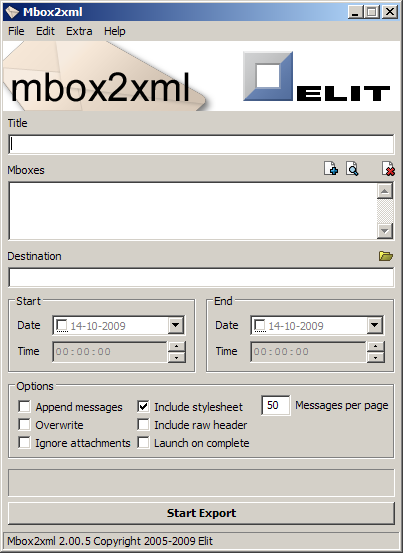
Backing up emails can be a cumbersome task, and the results are often not very user friendly nor easily accessible. These are the reasons that Mbox2xml was created. We thought an email backup tool should have the following properties: * Easy to use. * The backups should be easily accessible, both for humans and computer software. * The tool should allow for automation so it can easily be integrated with existing back-up methods. Therefore it was decided that the program should store the exported emails in an XML format which, together with a provided stylesheet, can be viewed in any modern webbrowser, no matter where the backup is stored. Also, XML is easily imported into existing software solutions. And finally, Mbox2xml has both a graphical user interface for ease of use, and a command line version for easier automation. Follow the link and free download Mbox2xml now.
Developer: Elit
Size: 7.44 MB
Download : Mbox2xml2.exe
DownTester allows you to easily test your Internet download speed in multiple locations around the world. It automatically test the download speed of the URLs that you choose, one after another. It moves to the next download URL after the specified number of seconds has been elapsed or after it downloads the specified amount of KB - just according to your preferences.
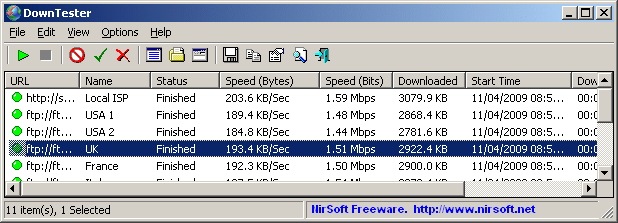
After the download test is finished, you can easily save the result into text/html/xml/csv file, or copy it to the clipboard and paste it into Excel and other applications.
System Requirements
This utility works with Windows 98,Me,2000,XP,2003,2008,Vista, and Windows 7.AuthorWebsite : nirsoft
File Size : 123 KB
Download : downtester setup.exe

Yeah, that’s right. Lunascape = IE (Trident) + Firefox (Gecko + Chrome + Safari (Webkit). On top of that, our proprietary technology realizes one of the fastest browsing speed and provides you with full of features and customizable options. It is light, snappy, and fun.
Lunascape has been downloaded over 10 million times in our home base Japan, and we are rapidly growing users all over the world since the launch of multilingual versions.
No more oh-so-slow moment. No more messed-up page display. No more juggling multiple browsers. Your internet experience is a lot better with Lunascape. Experience it yourself, the whole new speed and versatility.
What´s New in version 5.1.5:
- We have updated both Gecko and Webkit engines to the latest versions.(Gecko 1.9.1.3 and Webkit 532.0). Webkit achieves 20% faster JavaScript speed compared to the one in our previous version and Gecko includes various vulnerability fixes.
- We have included some new features such as tab activation option using mouse wheel.
- e have fixed lots of bugs this time including default browser setting, title bar, IE history, highlighting functions, and install and uninstall options.
File Size: 8.44MB
Download: lunascape.jp

Panda USB Vaccine is a free utility from Panda Security Research which helps prevent malware infections due to the autorun feature of Windows Operating Systems. Once executed the user can choose two types of vaccinations: Computer Vaccination or USB Drive Vaccination.
USB Vaccine allows users to vaccinate their PCs in order to disable autorun completely so that no program from any USB/CD/DVD drive (regardless of whether they have been previously vaccinated or not) can auto-execute. This is a really helpful feature as there is no user friendly and easy way of completely disabling autorun on a Windows PC.
Panda USB Vaccine can be used on individual USB drives to disable its autorun.inf file in order to prevent malware infections from spreading automatically. When applied on a USB drive, the vaccine permanently blocks an innocuous AUTORUN.INF file, preventing it from being read, created, deleted or modified. Once applied it effectivelly disables Windows from automatically executing any malicious file that might be stored in that particular USB drive. The drive can otherwise be used normally and files (even malware) copied to/from it, but they will be prevented from opening automatically. Panda USB Vaccine currently only works on FAT & FAT32 USB drives. Also keep in mind that USB drives that have been vaccinated cannot be reversed except with a format.
VisitWebsite
DOWNLOAD(744 KB)

Copy your favorite webpages to hard disk with PageNest. Give PageNest the address of a website and it will copy either the page, or the entire site (whichever you prefer) to your hard disk. It will create an exact copy of what you see in your browser including the text, html, images and css
VisitWabsite
Download 1.8MB
Use PageNest to create a 'cache' of pages you read regularly. Use PageNest to store copies of websites so you can read them when you are not connected. Use PageNest to archive sites before they change or disappear.
PageNest Free Edition is a cut down version of our commercial PageNest Pro. As the free version of a commercial product it is guaranteed free of spyware, viruses and other malicous code.
* Keep a permanent copy of useful websites - use PageNest to copy websites and pages to hard disk before they disappear from the internet.
* Fast multithreaded downloading engine. PageNest can download up to forty files at once to make the best use of your connection download pages as quickly as possible.
* Designed to be easy to use. PageNest includes many unique features to make you life easier. For example, the clickable list of recent downloads, buttons to move between sites in a single click, and a range of sensible defaults so you rarely need to change many settings.
* Download once, browse anywhere. PageNest converts all links withing the site to 'relative' links. All files are saved to your hard disk as standard html, jpeg, etc files. You can browse the sites either within PageNest or from your favorite browser. Because they are ordinary files, you can, for example, copy them to a laptop and take them with you to view when away from an internet connection.
* Download any file type: html, shtml, php, asp and any other file type will be downloaded correctly by PageNest and given the correct extension so it is usable on your computer.
* Still stuck on dial up? PageNests long history means it has many useful features for dial up users, at a time when newer competitors assume you are on broadband: PageNest downloads sites quickly and the sites can be browsed without an internet connection, saving you time and money; It's unique 'Dial Protection' prevents whatever browser you use from attempting to open a dial up connection unless you let it; You can also set PageNest to automatically dial a connection and hang up afterwards.
Creating accurate copies of websites can be difficult. We have the experience to make PageNest cope with just about any site.
PageNest is compatible with Windows Vista, XP, 2000, Me and 98.
This free edition is available for non-commercial use. That means it can be used in the home, or by schools and non-profit organisations.

Google Chrome is a browser that combines a minimal design with sophisticated technology to make the web faster, safer, and easier.
Search from the address bar
Type in the address bar and get suggestions for both search and web pages.
Thumbnails of your top sites
Access your favorite pages instantly with lightning speed from any new tab.
Private browsing
Open an incognito window when you don't want to save your browsing history.
VisitWebsite
Download 535 Kb

