Showing posts with label System Utilities. Show all posts


USB Safeguard is a portable software program to encrypt and protect data with a password on your removable pen drives using the AES 256 bits encryption.
Simply drag and drop files and folders to quickly protect your sensitive documents, and then enter an password to encrypt and decrypt the files that you want to protect from prying eyes.
Not only encrypts your files, it also has “Safe Internet Browsing” option to surf safe on web and removes all Internet traces like URL history, typed URLs, typed passwords in web forms and etc. Built in file shredder - i.e. wiping the contents of the original pre-encrypted file, and more.

Your data is secure while the drive it is out and about with you in an Internet cafe´s or at work.

Download File :
Author Website : USB Safeguard.comFile Size : 736 KB

Features :
  • Runs with any usb pen drive
  • No installation required
  • Easy drag & drop file adding
  • Built in file shredder
  • Secure your data if drive is lost
  • Supports FAT16, FAT32 and NTFS file system
  • 100% portable

31 March 2010 5 komentar

Total protection for your PC - Comodo Internet Security´s award-winning Comodo Firewall with Default Deny Protection, fully Antivirus, Host Intrusion Prevention and the new auto sandbox feature defends your PC against viruses, malware, hackers, root-kits, Trojans, and zero-day attacks. Join the more than 10 million PC users worldwide recommending and using this easy-to-install and configure suite. Comodo puts Internet safety on your desktop

Little Registry Cleaner is an open source that is designed to cleanup Microsoft Windows Registry. It removes obsolete or unwanted items that build up in the registry over time in order to improve the stability and performance of your computer.

26 February 2010 1 komentar

his is actually a free version of the software developed by Paramount Software UK Ltd. It is compatible on Windows XP

and Vista OS. In order to back the data, this free tool simply creates the image of the hard disk or its partition.
The program might not impress you by its features, but its user interface will surely leave some mark. Its interface allows you to all its features offered in the easiest possible way. And few minutes with the program will make you an expert with it.
Although Macrium Reflect Free Edition works at a slower pace, but its interface with professional touch surely makes your data backup tasks easier.


Features
  • Create an image of the hard disk or its partition using Microsoft Volume Shadow copy Service (VSS).
  • It offers you with an integrated scheduler.
  • Image to Network, USB, FireWire drives and DVD.
  • Create a Linux rescue CD with Network access and full GUI
  • Integrated CD/DVD packet writing engine
  • Amazing user graphical interface
  • Compatible on 32 bit and native 64 bit versions
  • Offers industry leading compression levels and speed
Screenshots:
max 1 

max2

Performance
Macrium Reflect Free Edition offers you with best of the performance but it consumes good amount of your computer resources which might not allow you to do other works, but such a performance is expected from any data backing program.
Reliability
It is one reliable package in a whole. With the number and kind of features it offer, all your data backup tasks become simple, fast and easy.
Interface
It is its user interface which gives it an edge over other free data backup programs. Data backup is a critical task and complicated interfaces make it more complex. When it comes to user interface, Macrium Reflect Free Edition is a complete contrast.
Misc
Apart from conventional data backup tasks, Macrium Reflect Free Edition also offers you with inbuilt scheduler, Linux Rescue CD, BartPE Rescue CD plug-in, Network support, CD/DVD writing support and much more.
Pros
  • Easy to use
  • User friendly graphical interface
  • Compatible on 32 and 64 bit OS
  • It is completely free
Download : Macrium Reflect

20 February 2010 2 komentar


Desktops allows you to organize your applications on up to four virtual desktops. Read email on one, browse the web on the second, and do work in your productivity software on the third, without the clutter of the windows you’re not using. After you configure hotkeys for switching desktops, you can create and switch desktops either by clicking on the tray icon to open a desktop preview and switching window, or by using the hotkeys.

Using Desktops

Unlike other virtual desktop utilities that implement their desktops by showing the windows that are active on a desktop and hiding the rest, Sysinternals Desktops uses a Windows desktop object for each desktop. Application windows are bound to a desktop object when they are created, so Windows maintains the connection between windows and desktops and knows which ones to show when you switch a desktop. That making Sysinternals Desktops very lightweight and free from bugs that the other approach is prone to where their view of active windows becomes inconsistent with the visible windows.
Desktops reliance on Windows desktop objects means that it cannot provide some of the functionality of other virtual desktop utilities, however. For example, Windows doesn't provide a way to move a window from one desktop object to another, and because a separate Explorer process must run on each desktop to provide a taskbar and start menu, most tray applications are only visible on the first desktop. Further, there is no way to delete a desktop object, so Desktops does not provide a way to close a desktop, because that would result in orphaned windows and processes. The recommended way to exit Desktops is therefore to logoff.

Homepage: http://technet.microsoft.com/
Download: Desktops.zip
File Size: 60.2KB

04 February 2010 0 komentar

Virus Effect Remover is a tool which helps you to remove the effect of viruses from the Windows Registry and File System.
It also detects the registry error caused by viruses and enables the Blocked content like task manager, registry editor, folder option, etc.


Requires Microsoft .NET Framework 2.0.


What’s New in version 1.9:
  • New Tools option like File Recovery, Alternate Explorer & process List
  • Generation
  • Better Help
  • More Efficient File search
  • System Repair Option
  • More Registry optimization
Homepage: http://sourceforge.net
File Size: 806KB
 Download: Virus_Effect_Remover1.9.zip

13 November 2009 0 komentar

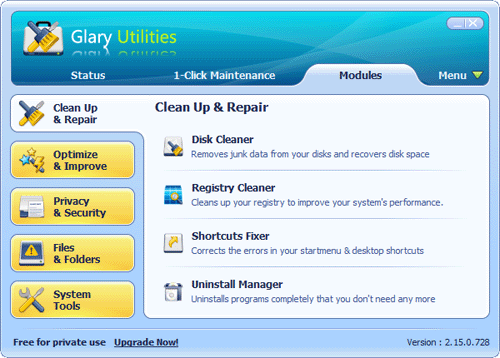
One Click A Day For PC Maintenance, Keeps Any PC Problems Away. With millions of worldwide users, the first-rank & free Glary Utilities is an INDISPENSABLE friend for your PC, with its 100% safe, thorough & quick cleaning and worry-free restoration.
Glary Utilities is a freeware with registry and disk cleaning, privacy protection, performance accelerator and amazing multifunctional tools. It can fix dogged registry errors, wipe off clutters, optimize internet speed, safeguard confidential files and maintain maximum performance.


It is designed for both novice and professionals. User-friendly interface shows clear & detailed directions. For novice, all work can be done with just 1 or 2 clicks, while for professionals, abundant options are available.
To call Glary Utilities helpful would drastically understate the situation. It hopes to become your INDISPENSABLE friend with its one-stop-shop utilities for optimizing and maintaining your PC for best performance. My friend, welcome to have a try for Glary Utilities and have your say

Author Website : ClarySoft
File Size : 5.78 MB
Download : GUSetup.exe

27 October 2009 0 komentar

Quicksys RegDefrag is a freeware utility to defrag Windows Registry. Quicksys RegDefrag is small, clear and easy. Registry data is constantly being written to and removed during a normal Windows operation. Over time this data becomes fragmented.
Quicksys RegDefrag optimizes your registry by removing gaps, fragments and wasted space in Windows registry files.
The defragmentation improves whole performance and boosts access to the registry.
Note from FreewareFiles: The setup program includes a toolbar which does not have to be installed touse the software.


What’s New in version 2.6:
  • Fixed freeze when loading analysis information. (Windows XP/Vista)
  • Improved installer.
  • Minor bugs fixed.
Homepage: http://www.regdefrag.com/
File Size: 3.36MB
Download: qregdefrag_setup.exe

18 October 2009 1 komentar


RunScanner is a completely free windows system utility which scans your system for all configured running programs. You can use runscanner to detect autostart programs, spyware, adware, homepage hijackers, unverified drivers and other problems.
You can import and export your results and let other people help you to solve your problems.
Features:
  • Scanning of 74 startup/hijack locations.
  • Fixing of invalid entries.
  • Saving and importing of .run files (all information available)
  • Marking of items - A user with problems can save the .run file, an expert can mark the items that need fixing and send the .run file back to the user.
  • Process killer: Kill multiple processes at once, Kill and rename, Kill and delete, Delete at next reboot
  • Host file editor.
  • Verification of file signatures.
  • MD5 hash calculation of files.
  • Online lookup of scanned entries.
  • Google lookup.
  • Regedit jump.
  • Explorer jump.
  • Whitelist filter.
  • Online rating of found entries bases on MD5 hash.
  • Save to text log file.
  • Online analysis of results.
Warning: Runscanner requires advanced knowledge about Windows. If you delete an item, without knowing what it is, it can lead to major Windows problems. If you are not sure what to delete, post your Run file to a helper forum.
What’s New in version 1.9.0.9:
  • Enhanced whitelisting
  • Windows 7 support (32 bit)
  • Run files now include the list of installed software on the computer.
  • Minor bug fixes
Homepage: http://www.runscanner.net/
File Size: 1.45MB 
Download: runscanner.zip

03 October 2009 0 komentar


FileTypesMan is an alternative to the ´File Types´ tab in the ´Folder Options´ of Windows. It displays the list of all file extensions and types registered on your computer. For each file type, the following information is displayed: Type Name, Description, MIME Type, Perceived Type, Flags, Browser Flags, and more.
FileTypesMan also allows you to easily edit the properties and flags of each file type, as well as it allows you to add, edit, and remove actions in a file type.
This utility works on any version of Windows from Windows 98 to Windows Vista. For using this utility under Windows 98/ME, you must download the non-Unicode version.
What’s New in version 1.5.1:
  • Added ‘Choose Icon’ dialog-box like in the file types manager of Windows, to allow you to easily choose the desired file type icon. (Works only on Windows XP or greater)
Homepage: http://www.nirsoft.net/
File Size: 55.8KB 
Download: filetypesman.zip


Clean your hardisk to get best performance! Save disk space by finding and clean duplicate files on your hard drive or network. Duplicate Cleaner can find duplicate files, music (MP3, M4A, M4P, etc), photos, videos or documents - if it is duplicated on your system then Duplicate Cleaner will find it! It then offers you many ways in which to safely select and move.

Features:
* True freeware, no nags or spyware, nothing to pay.
* Find Duplicate Files by content (MD5 hashing)
* Fastest Scanning and accurate duplicate comparison.
* Deep scans music - iTunes formats supported.
* MP3,M4A,M4P,OGG,APE,WMA,FLAC
* Flexible search parameters
* Intelligent Selection Assistant
* Search home or networked drives
* Search in multiple locations
* Export and Import results in CSV format
* View Path,Size and Date of files
* Large, resizable list window
* Image preview window
* Delete duplicate files to the Recycle bin
* Move duplicate files to a new location
* Turn duplicate files into hard links (NTFS file systems only)
* Protection for Windows and system files

Author Web: digitalvolcano.co.uk
File Size: 1.77MB
Download: DuplicateCleaner_setup.exe

14 September 2009 0 komentar


Your Firefox is working slowly?
Mozilla Firefox is by far the best feature-rich and fastest browser out there, but with the passage of time it slows down considerably. It will take a lot of time to load during startup, the overall speed will be effected, and browsing Histories will be too slow. This is very common problem and it occurs largely because of fragmentation of databases.

Boost Firefox in a single click with SpeedyFox absolutely for free!
You get:
# Boost Firefox startup in up to 3 times!
# Speed-up browsing history
# Quicker operation with cookies
# Soon: SpeedyFox for Mac

Once installed, SpeedyFox automatically detects your Firefox’s default profile. If you have more than one profile, you can select the one you want to optimize from the drop-down menu. If you have portable version of Firefox, choose your profile path manually by selecting "Custom..." profile. All you have to do is hit the Speed Up Firefox button.

Author :Cristalidea
FileSize : 330KB
Download speedyfox.exe

13 September 2009 0 komentar


TimeComX is a easly tool that can put your computer into different states after specified time.Following options are handle to:

* Restart
* Shutdown
* Hibernation
* Suspend
* Alarm-clock


Freeware Features:

* The program is equipped with a transparency mode and can be optionally kept in the background by a Tray Icon.
* TimeComX has one default alarm sound which can be replaced by any sound you like.
* Within a fixed period of time before the countdown has run out, you will be optically advised of it and a bit later acoustically as well.

What’s New in version 1.1.7:

* installation routine supports UAC
* fixed shortcut bug
* added stopwatch mode
* added full counter mode
* improved user interface
* splash screen can be disabled
* improved network usage measure
* some minor tweaks

Homepage: bitdreamers.com
File Size: 2.39MB
Download

06 September 2009 0 komentar


Active@ Partition Manager is an application that helps you manage storage devices and the logical drives or partitions that they contain. You may create, delete, format and name partitions on your computer without shutting down the system. Most configuration changes take effect immediately.

Active@ Partition Manager includes the following features:

* Create a partition or logical drive
* Format a logical drive or partition (FAT16, FAT32, NTFS)
* Assign or change partition attributes
* Format a Flash memory as NTFS
* Delete a partition or logical drive
* Create FAT32 partitions greater than 32GB in size (up to 1Tb)
* Mark partition as active.
* Create several partitions on a USB flash memory device
* View the properties of a partition, logical drive or hard drive device

Active@ Partition Manager is a component of Active@ Boot Disk (Windows-based LiveCD)

Visit Homepage
Download 4.29 MB

31 August 2009 0 komentar


This .NET Framework cleanup tool is designed to automatically perform a set of steps to remove selected versions of the .NET Framework from a computer. It will remove files, directories, registry keys and values and Windows Installer product registration information for the .NET Framework. The tool is intended primarily to return your system to a known (relatively clean) state in case you are encountering .NET Framework installation, uninstallation, repair or patching errors so that you can try to install again.
There are a couple of very important caveats that you should review before using this tool to remove any version of the .NET Framework from your system:

* This tool is designed as a last resort for cases where install, uninstall, repair or patch installation did not succeed for unusual reasons. It is not a substitute for the standard uninstall procedure. You should try the steps listed in this blog post before using this cleanup tool.
* This cleanup tool will delete shared files and registry keys used by other versions of the .NET Framework. If you run the cleanup tool, you will need to perform a repair/re-install for all other versions of the .NET Framework that are on your computer or they will not work correctly afterwards.

The .NET Framework cleanup tool supports removing the following products:

* .NET Framework - All Versions
* .NET Framework - All Versions (Tablet PC and Media Center)
* .NET Framework - All Versions (Windows Server 2003)
* .NET Framework - All Versions (Windows Vista and Windows Server 2008)
* .NET Framework 1.0
* .NET Framework 1.1
* .NET Framework 2.0
* .NET Framework 3.0
* .NET Framework 3.5

Not all of the above products will appear in the UI for the .NET Framework cleanup tool on every operating system. The cleanup tool contains logic so that if it is run on an OS version that includes the .NET Framework as an OS component, it will not offer the option to clean it up. This means that running the cleanup tool on Windows XP Media Center Edition or Tablet PC Edition will not offer the option to clean up the .NET Framework 1.0, running it on Windows Server 2003 will not offer the option to clean up the .NET Framework 1.1 and running it on Windows Vista or Windows Server 2008 will not offer the option to clean up the .NET Framework 2.0 or the .NET Framework 3.0.

When choosing to remove any of the above versions of the .NET Framework, the cleanup tool will also remove any associated hotfixes and service packs. You do not need to run any separate steps to remove the service pack(s) for a version of the .NET Framework.

Homepage: http://blogs.msdn.com/
Download: dotnetfx_cleanup_tool.zip
File Size: 249KB

18 August 2009 0 komentar


BatteryCare is a software created to optimize the usage and performance of the modern laptop’s battery.
It monitors the battery’s discharge cycles and helps increasing it’s autonomy and improving it’s lifetime.

Features:

* Battery’s discharge cycles monitoring. The advanced algorithm accurately records when a complete discharge cycle is performed. When the configured number of discharge cycles is reached, a notification balloon pops up to remind that a full discharge is required.
* Complete battery information. It calculates the statistical remaining time in laptops that don’t support the battery time left information and only list the charge percentage. Shows all the detailed information about the battery, such as wear level, capacities, consumption, manufacturer, etc.
* Notification area information. In battery mode, the notification icon shows the remaining time and percentage of battery.
* Automatic power plans switching. Depending on the power source of the computer, BatteryCare can automatically select the power plan you prefer. (only in Windows Vista or higher).
* Control over Windows Aero and demanding Services. Automatically disable the graphics accelerated theme in Windows Vista and/or demanding services that degrade battery lifetime. Once the Gadget Laptop stops running on batteries, the theme is re-enabled and the stopped services are restored.
* Auto-updates. No need to trouble in downloading new installers, when a new version is available, the program updates itself.
* Lightweight in the system. Given the concern about the battery optimization, BatteryCare does not interfere with the system performance. It requires only a mere 0,1% of Processor and Memory resources.

VisitWebsite
Download (625 KB)
[www.freewarezoom.com]

21 July 2009 0 komentar


Rising PC Doctor is professional and smart security tool to computer users. With its seven key functions of automatic malware analysis, immunization of USB storage devices, ability to repair Microsoft Internet Explorer & Windows, Trojan Behavior Detector and Blocker, protection against malicious websites, Internet Explorer protection and Trojan Download blocker, Rising PC Doctor will greatly enhance your protection against malware and cyberthreats.
Hightlights:

* Trojan Behavior Detector & Blocker
* Trojan Download Blocker
* Automatic Malware Analysis

Features :

* Completely Redesigned Vulnerability Scan
* Strong Ability to Repair Microsoft Internet Explorer & Windows
* Powerful Process and Startup Management
* Advanced Tools for Experienced Users
* Spyware Scan & Removal
* Strong Protection against Current Trojans
* Privacy Protection

VisitWebsite
DOWNLOAD(8.9 MB)

13 July 2009 0 komentar


This is a perfect program to organize programs to run at the system startup or shutdown. Small and easy to operate.You can specify different conditions under which your programs should be started and you can activate programs at specified times or on specified days of the week.
If you want, it will run programs only once a day. You can shutdown the system automatically at a specified time or automatically if it has been idle for a certain amount of minutes.
This program can be used as a replacement for your autostart folder.
Simply create a link to this program in your autostart folder, then move the previous content of your autostart folder to the X-ecutor window via drag&drop and you are ready to go.

Features:

* Run programs on STARTUP, DURING OPERATION or on SHUTDOWN of your system
* Specify different conditions under which your programms should be started
* Activate programs to specific times or on specific weekdays, e.g. only fridays after 5:00 p.m.
* You can automatically run a program when you first start up your computer in the morning. e.g. to check your emails
* Run program at fixed time intervals. e.g. to synchronize files to a server
* Automatically SHUTDOWN system after it is idle for a specified amount of minutes, for example after a file backup.

The software is free for non-commercial use.

What's New in version 1.53.2.093:

* New property to run program with elevated user rights by using "RunAs". Usefull when using a Non-Admin-Vista- System.
* Internet update check starts 30 sec. after last startup program has been executed to ensure network/internet availability
* Insert seperator blocks into logfile on every startup/shutdown to enhance readability

VisitWebsite
Download By,Author 1.5 MB

06 July 2009 0 komentar


Panda USB Vaccine is a free utility from Panda Security Research which helps prevent malware infections due to the autorun feature of Windows Operating Systems. Once executed the user can choose two types of vaccinations: Computer Vaccination or USB Drive Vaccination.

USB Vaccine allows users to vaccinate their PCs in order to disable autorun completely so that no program from any USB/CD/DVD drive (regardless of whether they have been previously vaccinated or not) can auto-execute. This is a really helpful feature as there is no user friendly and easy way of completely disabling autorun on a Windows PC.

Panda USB Vaccine can be used on individual USB drives to disable its autorun.inf file in order to prevent malware infections from spreading automatically. When applied on a USB drive, the vaccine permanently blocks an innocuous AUTORUN.INF file, preventing it from being read, created, deleted or modified. Once applied it effectivelly disables Windows from automatically executing any malicious file that might be stored in that particular USB drive. The drive can otherwise be used normally and files (even malware) copied to/from it, but they will be prevented from opening automatically. Panda USB Vaccine currently only works on FAT & FAT32 USB drives. Also keep in mind that USB drives that have been vaccinated cannot be reversed except with a format.

VisitWebsite
DOWNLOAD(744 KB)

28 June 2009 0 komentar


AppRemover enables you to thoroughly uninstall security applications such as antivirus and antispyware from your computer.

Use AppRemover :

* When replacing one security application with another
* When competing security applications tie up your computer
* When the application’s built-in uninstall process fails
* When you have forgotten the application password

Uninstall the following application types:

* Antivirus
* Antispyware

VisitWebsite
Download 2.8MB

21 June 2009 0 komentar

Subscribe here

Advertising


Latest On Product Plastic